
WARNING: Some parts of Authentication are Advanced Features of Revelation helpdesk and should be used with caution.
It is strongly recommended you read the Azure Setup Best Practices section thoroughly before beginning the configuration.
Office 365 True-Sync allows for using the information available in the Azure AD Tenant to automatically provision and deprovision accounts in Revelation helpdesk.
The setup for Office 365 True-Sync in Revelation helpdesk is entirely dependent on your organizational structure, On-Premise AD configuration, as well as how you have Revelation configured in terms of Clients, Offices, Teams, Departments and User Roles. This section will highlight some best practices for setting up Office 365 True-Sync for some common organizational structures. It is recommended you familiarize yourself with each setup’s Best Practice before proceeding as the one best suited to your organization might be a combination of one or more of the configurations highlighted in this article.
Prerequisites
Before you begin with the provisioning, ensure the following are in place:
- An Azure account through your Office 365 business account
- If you are not an active Office 365 client, you will need to create a free Azure AD account and sync your ID. You can sign up for a free account here.
- An active tenant set up in Revelation in the Single Sign On option.
It is also recommended you have the following prepared ahead of time:
- Clients and offices should be configured in Revelation prior to the sync taking place.
- While you can use the tool to auto create these, it is highly recommended they are set up in Revelation first, and the AD Groups set up to match the Revelation groups.
- A good recommendation is to create specific dedicated groups. Thought and planning should go into evaluating the current Revelation structure if you have been using Revelation helpdesk already.
- If you are new to Revelation helpdesk, there may be core groups to set up prior to starting the sync.
NOTE: You can set up rules which can be tied to specific Azure AD Groups. You may have a Tech group, an Engineering group, a Marketing group, etc., provided an Azure AD tenant is set up for each group.
For information on the setup, please refer to the Office 365 Office 365 True-Sync Best Practices pages.
- Internal Help Desk Supporting a Large Organization with Many Departments
- Setting Up Help Desk Staff
- External Help Desks
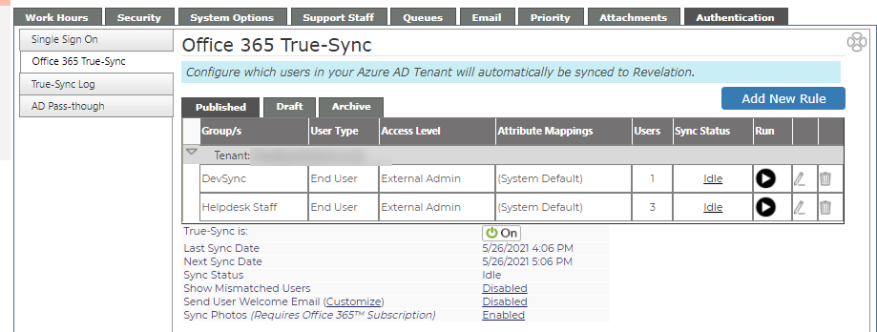
| True-Sync is | Shows if system is on or off |
| Last Sync Date | Last time the Sync was run (Date and time) |
| Next Sync Date | Next Sync to be run |
| Sync Status | Shows if the sync is running or idle |
| Show Mismatched Users | If enabled, shows the number of users in Revelation helpdesk who were not matched to users in Azure AD |
| Send User Welcome Email (Customize) | If enabled, will send a welcome email to new True Sync helpdesk users. This feature is customizable. Refer to the Custom Email Alerts section of the Helpguide, or click here. |
|
(Requires Office 365 Subscription) |
Syncs users profile pictures to Revelation. Images appear in the Single Sign On section of user's profile, as well as in Action Notes and Search. |