
License Configuration Notification
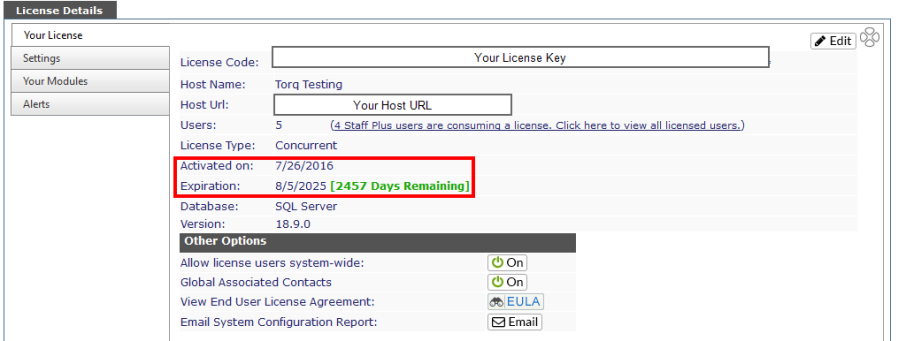
The information seen here is based on your Revelation licensing, and visible to Admin level users, but only Super Admin level users can make edits.
*Please note: If you are receiving a new license key for renewal, you must log out and back in for the license to take effect.
|
Pencil icon |
The only information which can be edited here is the License Code. If you need to update your license key, click on the pencil icon and copy and paste the new license code sent to you by YellowFish Software. |
|
License Code |
A unique identifier for your system. Activates any modules purchased with Revelation as well as setting the other information for your system such as number of users and license type. |
|
Host Name |
Who hosts your Revelation |
|
Host URL |
URL for your copy of Revelation |
|
Number of licensed users. If you have Staff Plus users, it will provide a link to a search to show all licensed users and their levels. Click on the link and view all your licensed users - regular and Staff Plus. |
|
|
License Type |
Unlimited, Concurrent, Per seat |
|
Activation |
Activation date for the current license |
|
Expiration |
Expiration date of your license. The text in green shows how many days you have remaining on the current license key. At 30 days or less, this text will be red. |
|
Database |
Type of database |
|
Version |
Revelation version in use |
|
Other Actions |
|
|
View End User License Agreement |
Click on this button to view the current EULA for Revelation helpdesk |
|
Email System Configuration Report |
The button sends information to YellowFish Software Tech Support with information on the setup of your Revelation Help Desk, including which modules are active. A dialog box will pop up to allow you to cancel out of sending. |
| Advanced Feature | |
| Allow license users system-wide | Allow normally external users to be set up as internal users, and vice versa. This is set up in the Support Staff area in Admin, or when setting up/editing an End User. |
| Global Associated Contacts | Allows adding anyone from any Location/Client/Department/etc. to any ticket. |
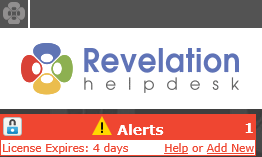
License Expiration Notice
If your license is with 30 days of expiration, Admins will see a notice in the header of Revelation, by their name.
License Configuration Notification
If your license is configured incorrectly, Admins will see the following notice on the login screen:
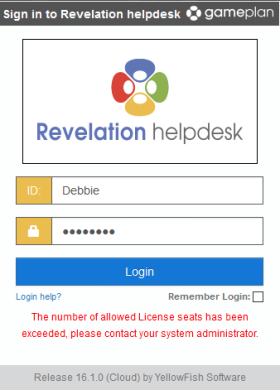
When you receive your new license key, simply paste it into the box and click on Save to refresh your Revelation.