
Turn an Active Project Type Inactive or an Inactive Project Type Active
Delete an Existing Project Type
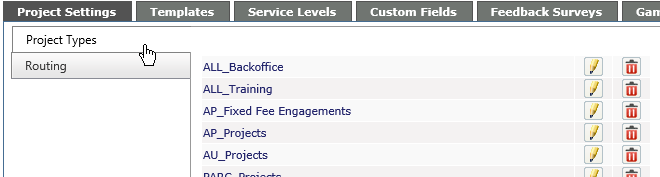
Project Types are a logical grouping of projects for cost tracking purposes. Examples of cost centers are Retainers, Time and Materials and Projects.
NOTES:
- You must have at least one Project Type added for the system to operate correctly.
- You can change the name from Project Type to what is appropriate for your company, in the Personalization section, if the module is active.
Add a Project Type
-
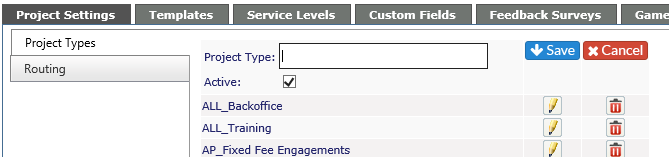
Click on Add New button at top right corner of list.
-
Enter a name for the Project Type
-
If the project is to be active, ensure the Active box is checked
-
Click on the Save icon when done or the Cancel icon if you don't want to save the Project Type
Edit an Existing Project Type
-
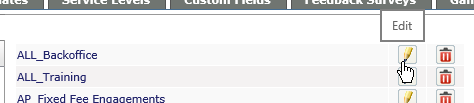
Click on the pencil icon to the right of the Project Type to edit
-
Make any changes required to the Project Type
-
Click on the Save icon when done or the Cancel icon if you don't want to save the changes.
Turn an Active Project Type Inactive or an Inactive Project Type Active
-
Click on the pencil icon to the right of the Project Type to edit
-
To turn an active Project Type inactive, uncheck the Active box
-
To turn an inactive Project Type active, check the Active box

Delete an Existing Project type
-
Click on the red X to the right of the Project type to delete
You will receive one of two messages
-
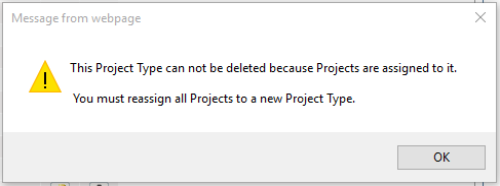
If the Project Type is assigned to projects in the system, you will see the following:
-
You will not be allowed to delete the Project Type until all projects are assigned to a new type
-
If the Project Type does not have any projects assigned to it, you will see the following:
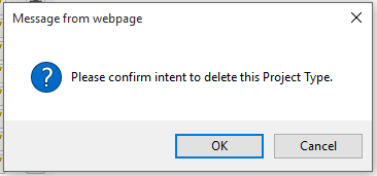
-
Click OK to delete or Cancel to keep the Project Type