
Holidays are days your location will be closed outside of regular hours such as Christmas and New Year's Day. Each holiday must be added separately to the system, though you only need to add a recurring holiday once. If the Service Level Management module is active, Revelation reads the Holidays and, if the company is closed, the system ignores those days in determining the due dates based on the SLA for the project. You may also create Partial Holidays with specific times and time zones, which can also be recurring.
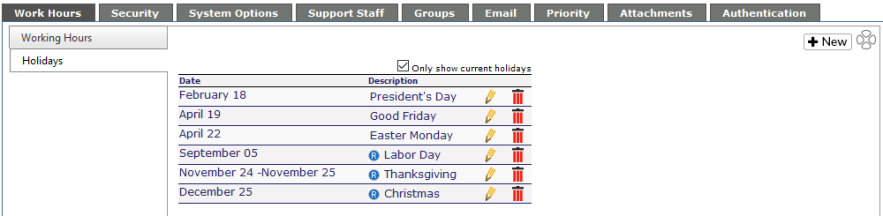
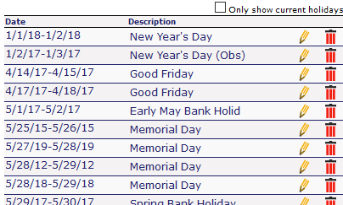
With the "Only show current holidays" box checked, only the next few holidays, as well as any recurring holidays will be visible. If this box is unchecked, all the holidays you have put in the system will be visible.
To add a holiday
-
Click on the New button at the top of the page
- Enter a description
-
Enter a date
-
-
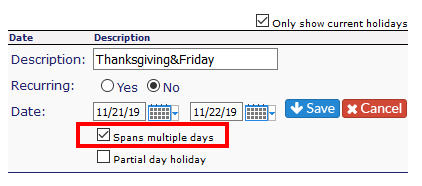
If the holiday spans multiple dates, check the box below the calendar
-
Put in the last day of the holiday
-
-
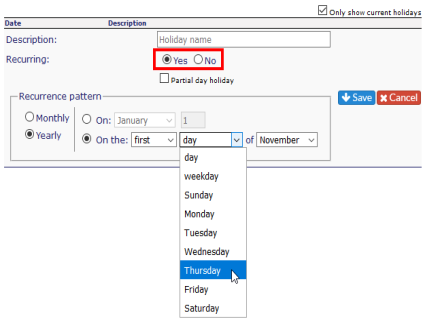
If the holiday occurs annually on the same date (i.e. Christmas), select the Yes radio button below Description.
- If the holiday has a recurring pattern, you can select the recurrence pattern. This can be done Monthly (specify the month and day) or Yearly (such as U.S. Thanksgiving Day, as shown below)
- If your company closes early on Fridays during the summer, or your office closes early prior to a holiday, you can select the Partial Day Holiday check box.
- Enter the date for the early closure
- Enter the start and end times
- Select the proper time zone
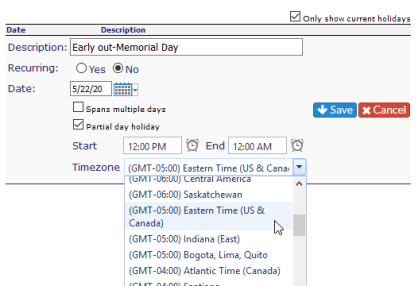
When you've added all the information click Save.
When you save the holiday, you will see an R in a blue circle to show this is a recurring holiday. 
To edit an existing holiday
-
Click on the pencil next to the holiday to edit
-
Edit the date and/or description
-
-
If the holiday now spans multiple days, check the appropriate box
-
If the holiday recurs annually, check the appropriate box
-
-
Click Save to keep the changes or Cancel to delete the changes
NOTE: If activated in the Admin area, the upcoming holidays will be visible on the Self Service Interface.
This feature is not available for Core users.