Fetching tokens
Overview
Once you have registered your first client, you can now request an access token from the authorization server.
You can retrieve the authorization server Token endpoint URL from the “Your API Details” section on the API integration dashboard:
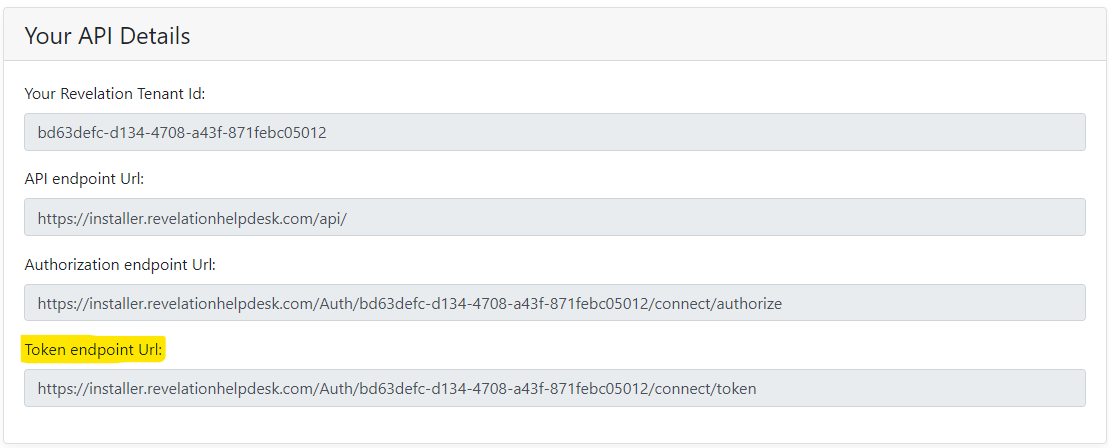
Based on your edition of Revelation helpdesk the URL format will be as follows:
Revelation Server (on-Prem)
https://<Your_Helpdesk_Url>/Auth/<Your_Tenant_ID>/connect/token
Revelation Cloud Edition
https://login.revelationhelpdesk.com/<Your_Tenant_ID>/connect/token
Request an access token
- Send a POST request to the Token endpoint URL
- Add the Content-Type header set to "application/x-www-form-urlencoded"
- Add a HTTP body containing the Client_ID and Client_Secret values you specified earlier when creating the Client. Also include the value grant_type=client_credentials in the body.
- Here is an example of a POST request using the curl command line utility
Code |
curl -X POST "https://installer.revelationhelpdesk.com/Auth/a2f1c943-0a73-43b5-b2f0-ce41fd0a841f/connect/token" -H "Content-Type: application/x-www-form-urlencoded" -d "grant_type=client_credentials&client_id=client-one&client_secret=32286bbb-8529-9ce1-bbe0-37bf959033e1 |
The response will return an access token in a JSON formatted string which will be valid for 3600 seconds or 1 hour.
Code |
{"access_token":"eyJhbGciOiJSUzUxMiIsInR5cCI6ImF0K2p3dCJ9.eyJuYmYiOjE3MjYxNTMzMDgsImV4cCI6MTcyNjE1NjkwOCwiaXNzIjoiaHR0cHM6Ly93aW4yMDE5LnJldmVsYXRpb25oZWxwZGVzay5jb20vYXV0aC9hMmYxYzk0My0wYTczLTQzYjUtYjJmMC1jZTQxZmQwYTg0MWYiLCJhdWQiOlsiUmV2ZWxhdGlvbi5BcGkiLCJodHRwczo…..","expires_in":3600,"token_type":"Bearer","scope":"revelation.api.all"} |