
Add Office
You can add additional offices by clicking on the Add Location button under Quick Tools on the upper right of the screen
or the New button just under the Locations tab.

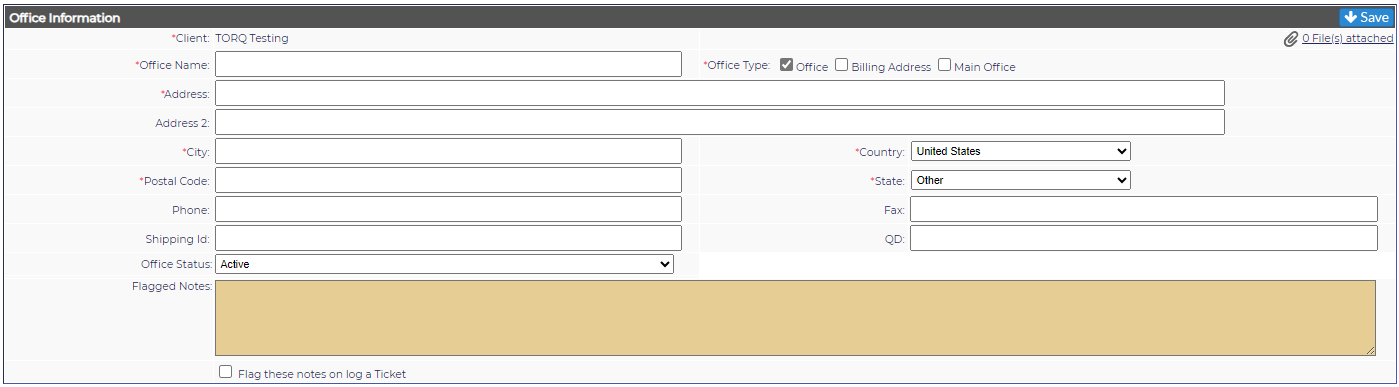
Office Information
The fields are as follows:
*Client: From the pull down, select the Client name. The client information will automatically fill in.
*Office Name: Office/City is normally used. A floor or mail stop may also be used.
*Office Type: Office is the default. If this is the billing address or the main location, those options should be checked.
*Address: The street/mailing address. If needed, use the Address 2 field.
*City
*Country: Select from the drop down
*Postal Code
*State: Select from the drop down
Phone
Fax
Shipping ID
Quick Dial
Location Status: A drop down for Active/Inactive
Flagged Notes: A section for adding notes to a specific Client office - adding information here will populate a Flagged Note in every ticket logged to this office.
When the Location Information is complete, click on Save in the lower right of the screen.