Burger Menu
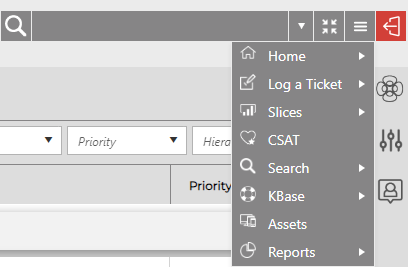
If your provider has activated it, you will see a Burger Menu on the top right side of your screen, after the Help Guide and Log off buttons.

Clicking on the Burger Menu will open a drop-down list of all the options available to you, matching the navigation buttons.
If there are any additional options for the nav buttons, they will be available via arrows. Hover over each option to see the available features.
Focus Button
With the Focus Button, you can open and close the Navigation buttons as well as the left column tools with one click. Focus mode shrink all toolbar icons for simplified view. To turn Focus mode off, simply click the Focus button again - your toolbars will reappear, and the screen resolution will readjust.
Focus Mode On

Focus Mode Off
