
Multi Edit allows users of Revelation to edit multiple tickets at the same time, based on their user level or team membership. Only Super Admins can activate or deactivate this module for Revelation. Multi User Edit settings allows for editing user settings as well as Bulk ticket logging against users and clients.
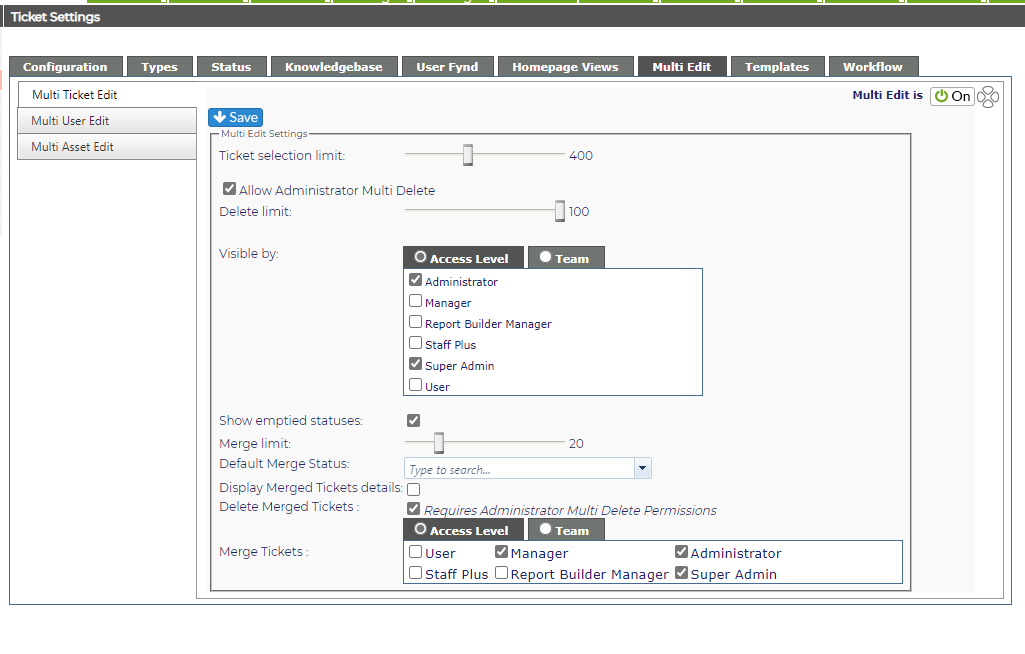
Multi Edit Settings
Based on permissions and settings, users will be able to edit the following areas:
-
Ticket Details
-
Add Actions
-
Ticket Hierarchy (if enabled)
-
Linked Assets (if enabled)
When enabled, Administrator Multi Delete allows any Admin level to delete multiple tickets at the same time.
Multi Edit is available in the following areas:
-
Home Page
-
Search results (Search Tickets only)
-
Tickets with No Action Report
Merge Tickets
If Multi Edit is active, users of Revelation to can merge multiple tickets at the same time, based on their user level or team membership. From the controls, you can set the following:
- Merge limit - limiting the number of tickets which can be merged at one time.
- Default Merge Status
- Display Merged Ticket Details (and actions of all tickets involved in merge)
- Delete Merged Tickets
If you make any changes, remember to save using the button at the top of the screen.