
WARNING: Patterns is an Advanced Feature of Revelation helpdesk and should be used with caution.
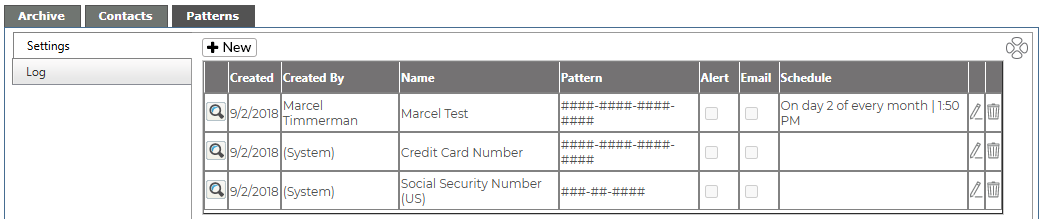
From this tab, Super Admins may set scheduled audits to search for possibly sensitive data, as long as it follows a configurable pattern, such as a Social Security Number or a credit card.
Add Pattern
By clicking on the New button, a dialogue box will appear to create a new pattern for the search.
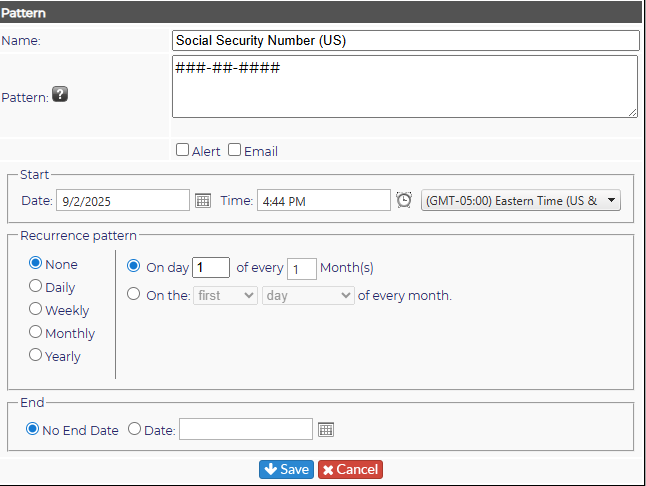
- Name the pattern
- Select the type of pattern
- The letter X for alphabetic characters
- A hashtag for numeric characters
- The at sign (@) for alpha-numeric characters
- Select if you want an alert or an email sent out (Received by Super Admins only)
- Set the schedule for the search.
If no schedule is set, you will be able to do a search based on the pattern in the Search area of Revelation.
Edit Pattern
Click on the pencil icon in line with the pattern you wish to edit. The dialogue box will appear and any edits needed can be made. Be sure to hit the Save button if you make any changes.
Delete Pattern
Click on the red garbage can in line with the pattern you wish to delete. You will be asked if you are sure you want to delete the pattern. Select OK to delete or Cancel to retain the pattern in the system.