Self Help allows you to search through the Revelation knowledge base to see if there is an answer to your issue. (This feature may not be available on your system.)
The main page includes a list of the newest articles, the highest rated articles and a Tag cloud.
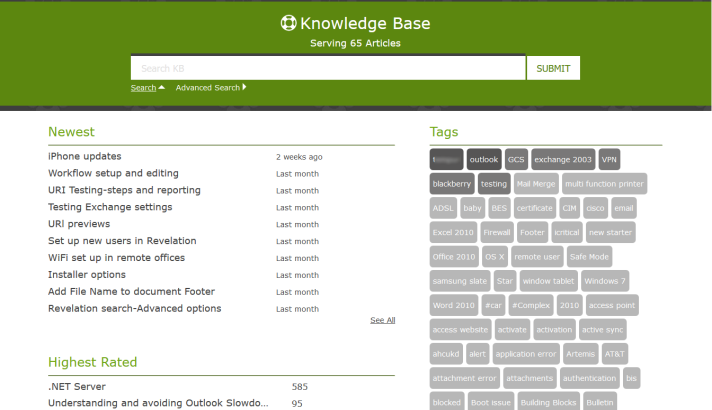
The darker the color on the tag, the more articles are available. Click on an item and a list of articles relating to the tag will be listed.
By clicking on an article, you will see the following:
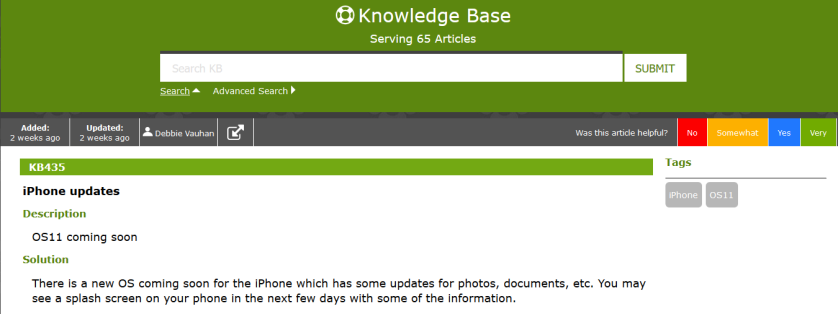
| Added: | When the article was added. Let's you know how new the information is. |
| Updated: | If the article was updated recently, the date will be different from the Added information. |
| Author's Name | Who wrote the article |
| Visibility | The icon will show if the article is only for your users, or if it is visible by both your users and your support desk |
| Rating | You are asked to rate the article. This will affect the Tag Cloud rankings. |
| KB### | The number assigned to this particular article. You can use it later to search for the article again. |
| Description | A brief description of the contents of the article |
| Solution | A more detailed description of the article, including any solutions for the particular issue. |
| Attachments/Links | If there are attachments (PDFs, Word documents, etc.) or links to websites as additional explanations, they will be shown below the Solution section. |
| Tags | On the right side of the article, will show you what tags have been assigned. |
Matching Articles: If multiple articles match your criteria, you can sort by the headers.
Click on the article to view.