

The Gameplan Slices is a centralized location where project managers can have a high level insight to all the projects that are being managed by them. The slices will display all the projects and display the percentage completed. In addition, project managers have the ability to see the number of hours used for the project and also see the breakdown of hours used for Workstream or by Person. The slices allow the project managers to see Cost vs Value for each project.
The Slices summary includes the following information:
- Tickets at Risk
- Late Tickets
- Tickets Due Today
- Ticket Due Next 7 days
- Exceeded Dates
- Exceeded Effort
Click on the number associated with the issue to get an option to show the tickets in a search window or in a grid format below the charts.
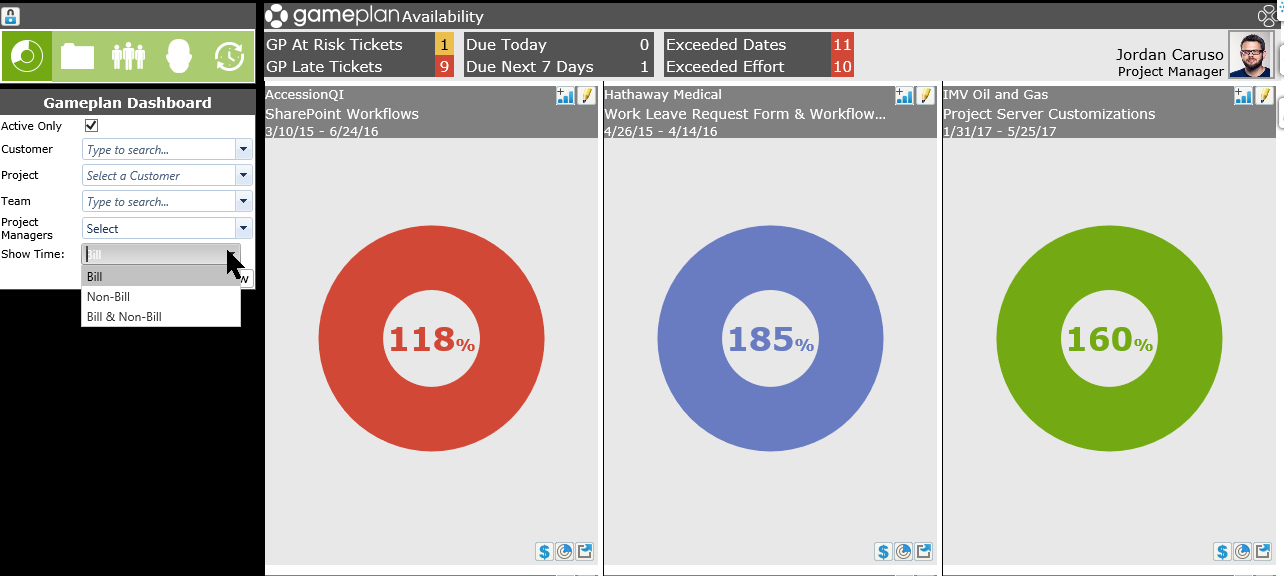
From the Gameplan Slices selection boxes, you can make the following selections:
- Active only - uncheck to see both Active and Inactive Gameplan projects
- Client - Use the drop down to select a specific project
- Project - When a client is selected, you will be able to choose from that client's Gameplan projects
- Team - See Gameplan information based on a specific Team or Teams. Use the check boxes in the drop down to select multiple teams.
- Project Managers - If you have multiple Project Managers, you will be able to select which PM's projects you want to see, or select all.
- Show Time - Choose between Billable, Non-Billable or both for the chart.
Note: If your screen resolution is set to less than 1,440 pixels, the flyout on the right side of your screen (Activity Feed and Revelations) will collapse, giving more space to the charts.