Auto Reminder
There may be occasions where a status warrants having an auto reminder for the end user and requires to respond to the ticket.
To enable this:
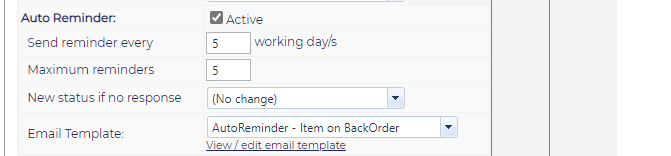
Select the box near to Active
You may choose the number of working days & the maximum reminders you would like the end user should receive
You may select a New status if there is no response
You may also select a previous created Email Template that you would like this auto reminder to be applied to
Within the ticket, once a status with an auto reminder has been selected, a green bar will display, indicating the selected intervals
