
There will be times when an action note has been added to the wrong ticket, or needs to be broken out to a new ticket. Revelation helpdesk allows you to do both. This page will show you how to split actions to a new ticket. To move the actions into an existing ticket, click here. Configuration of this feature is set in the Admin area.
Note: You will only be able to move actual action notes. You will not be able to move System Actions.
To split an action into a new ticket:
- Open the ticket with the action note to be moved to a new ticket
- Check the notes which need to be moved
- Use the drop-down menu from the Ticket Toolbar to select Split into new Ticket
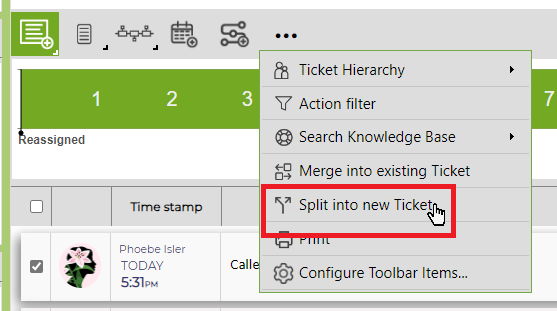
- A new log a ticket screen will pop up.
- Create as you would any new ticket and click Log
You will save the item as a new ticket. The action note which was moved will carry over the same time and any attachments.