
The 5 Star Rating system allows your Users to rate your performance on a specific ticket. Responses are recorded and available in Reports or on the CSAT button in the Masthead, providing an overall look at responses.
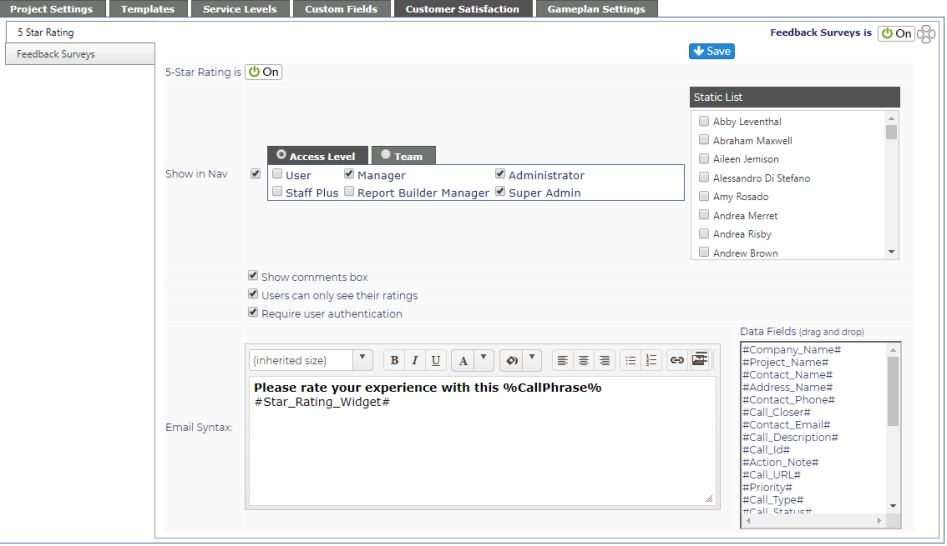
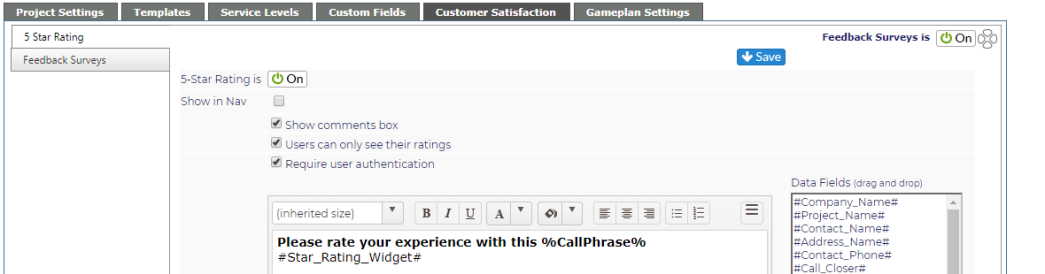
If Show in Nav is turned off, you will not see the Static list option.
| 5-Star Rating is |
On/Off button NOTE: This is turned Off by default. To use the system, you must turn it on. |
| Show in Nav | Check box if you'd like to see the CSAT button in the masthead |
| Static List | Select specific staff who can see the CSAT button in the masthead |
| Access Level/Team | Select who can see the CSAT results |
| Static List |
Select specific individuals who will be able to see the results |
| Users can only see their ratings | When checked, users will only see the ratings on their tickets. If unchecked, they will be able to see all rated tickets. |
| Email Syntax | Set up the email sent to your Users. The #Star_Rating_Widget# must been in the email. This creates the stars the users will select to rate the ticket. The syntax can be added to a Custom Email Alert. |
| User Authentication | When checked, users would be required to be authenticated in order to submit a 5 Star Rating. By default, authentication is required. If unchecked, any user with access to the Closed Ticket email would be able to rate the ticket. |
NOTE: We recommend you change the Ticket Closed default email notification so that the Subject Line clearly states a rating is requested. This will make it more visible to your end users.
Suggestion: Please rate our service - %CallPhrase% #Append_Syntax# (Closed)