
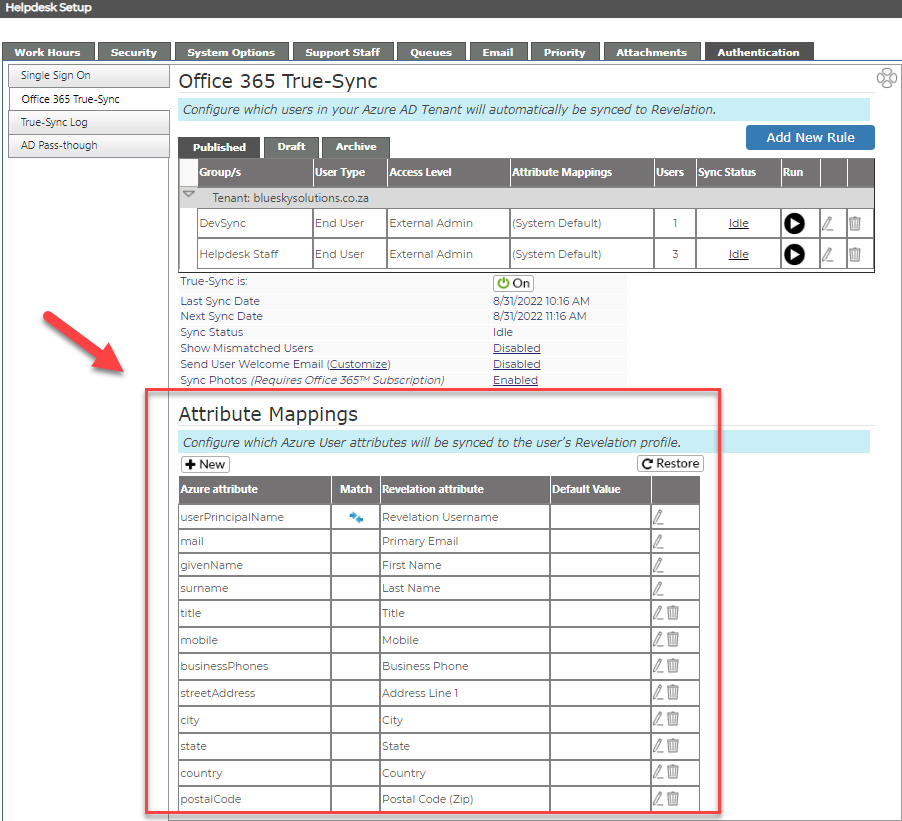
The rest of the user profile fields are configured under the “Attribute Mapping”. Here you can choose which Azure attributes will be synced to your user’s profile in Revelation and which field will be used to match existing users. We recommend you use the out-of-box settings that come pre-configured which uses the Azure User Principal Name (UPN) and the Revelation UserName fields to match users already created in Revelation. If you'd like to customize attributes, click here or proceed to the "Custom Attributes" topic.
Note: If you have previously used the Legacy AD import LDAP module to import users into Revelation from your on-premise AD, they will be matched automatically using their SID even if their UPN does not match their Revelation Username.
Next is the Sync Test.