
Asset Management allows Revelation users to link specific assets (equipment) to locations and/or users. Assets can be moved to another location if assigned staff moves, or to another staff member if the equipment is transferred. You may also assign assets to an Owner, allowing the asset to remain associated to a staff member in the event the end user is no longer active. This would allow the ability to still log a ticket against an asset.
Your role/access level will determine which assets you will be able to view:
- External Admin –all assets at all locations
- Regional Manager –all assets and locations for a specific region
- Location Admin – all assets for a specific location
- User – all assets assigned to the user (as end user)
Reports can be run based on the assets, giving the help desk personnel the ability to track issues with certain equipment or types.
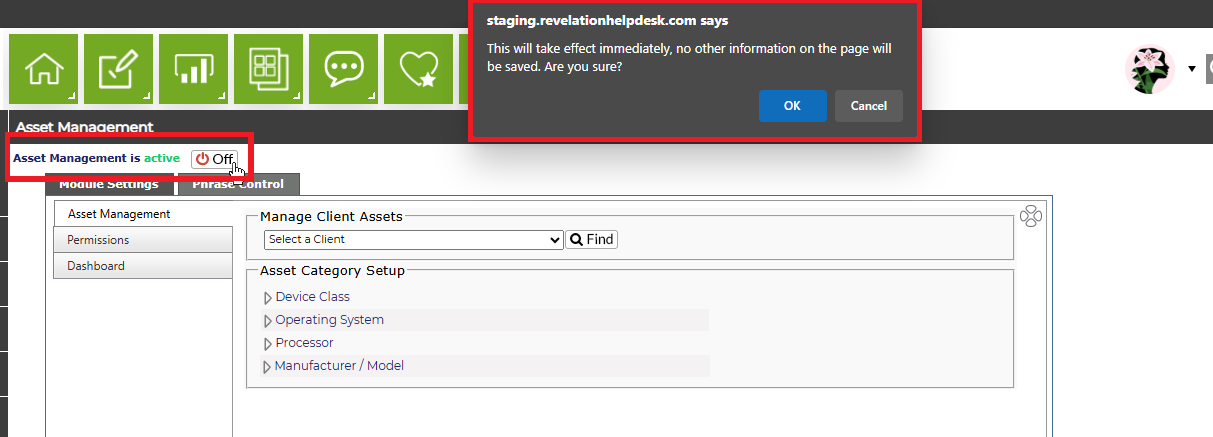
From the main area of this module, you can turn Asset Management on or off. When you select the option to turn off, you will see a warning box. If you wish to proceed, click OK, otherwise click Cancel.
This feature is not available for Core users.