
-
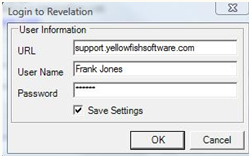
The first time you use the Rev-OB, you'll be asked to enter your Revelation login credentials.
-
When an email arrives that you want to send directly to Revelation, just highlight that email in your inbox and click the "Add to Revelation" button in the Standard toolbar of Outlook.

-
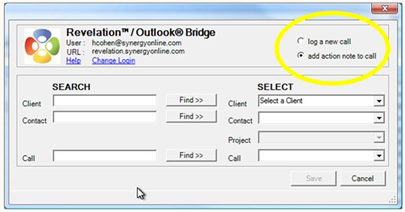
A dialogue box will appear. In the upper left corner, select "log a new call" or "add action note to call".
Note: Ticket and Call are interchangeable in Revelation. Our default is Ticket, but the term can be changed within the System Phrases section of the Admin area.
-
If you're adding action notes to an existing call, you'll be able to find the call you want easily even if you don't know the ticket number. Just enter the client or contact name. You'll be able to select from users and projects currently active to help you focus in on the right ticket.
-
Once you've found the right ticket just click Save and your ticket is updated.