The items below in blue are required; the items in gray, when disabled (thanks to Revelation's transparent feature set), do not appear on your screen. They are visible only when they have been enabled by an Administrator.
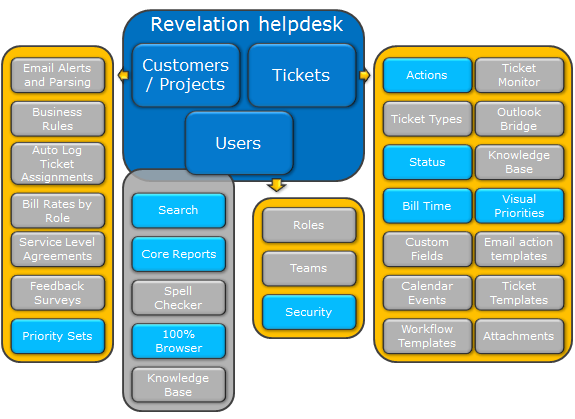
To drill down even further:
Users
There are three levels of End User, not shown here. The level determines what they will see when they log in to view their tickets, etc. within your Revelation. Internal Users have Roles, may be assigned to Teams and have Security levels assigned based on their Roles and Teams.
Business Rules
Business Rules are set for Projects. Email notifications can be set globally for projects or can be customized based on customer requirements or requests. Service Levels can be set if the appropriate module is active within Revelation. Rules can be set up within Projects to automatically log tickets from emails sent by the Client's End Users, or by templates within the system. Rates for staff can be set by Role, so one person may have multiple rates assigned.
Tickets
Tickets have Actions logged against them. You may also have Ticket Types and a variety of Statuses available for the tickets, if you wish. Time can be allocated against the tickets as needed or required.
Assets
There is an Asset Module available for Revelation. If enabled, assets can be logged against Users, Clients or Locations.