
This feature is not available for Core users.
Saved Searches can be shared with other Revelation helpdeskusers.
- Click on the Saved tab under Searches
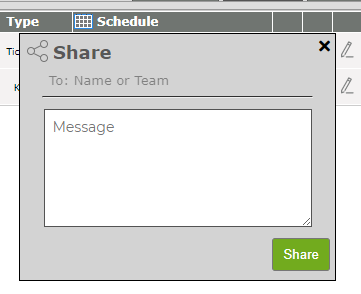
- Click on the Share icon
- Use the To: Name or Team drop-down to select the Revelation users to share the search with.
- Click the Save button

NOTE: This is only available in the Saved Searches tab.
The person you've shared with will receive a message with the link. Clicking on the link will take them to a Search page, run the search and give them the option to save the Search for future use.
NOTE: While Shared Searches ties to the @Tagging function, it only applies to the Message Feed and Email options for notifications. It does not put a notification or the link into the user's Activity Feed.