Scopes
Scopes in a REST API are a way to define permissions and ensure that applications only have access to the data they need. It is recommended to use the principle of least privileges to only grant an application the permissions it absolutely needs to function.
Defining scopes
The Revelation helpdesk API has a predefined set of scopes. When you create a new Client in the API dashboard you can assign the application limited scopes. For example, the revelation.api.user.read scope allows you to read (HTTP GET) user related data but does not allow you to make updates (HTTP POST). The revelation.api.client.manage scope allows you to read and update client related data and the revelation.api.ticket.all scope will allow you to read, update and delete ticket related data.
Here is a full list of current scopes available:
| Scope | Description |
| revelation.api.all | Access to all Revelation helpdesk API resources. |
| revelation.api.client.read | Access to read Revelation helpdesk API Client resources |
| revelation.api.client.manage | Access to READ / WRITE Revelation helpdesk API Client resources |
| revelation.api.client.all | Access to ALL Revelation helpdesk API Client resources |
| revelation.api.quicknote.read | Access to Read Revelation helpdesk API Quick Note resources |
| revelation.api.chat.all | Access to ALL Revelation helpdesk API Chat resources |
| revelation.api.user.read | Access to READ Revelation helpdesk API USER resources |
| revelation.api.user.manage | Access to READ / WRITE Revelation helpdesk API USER resources |
| revelation.api.user.all | Access to ALL Revelation helpdesk API USER resources |
| revelation.api.project.read | Access to Read Revelation helpdesk API Project resources |
| revelation.api.project.manage | Access to READ / WRITE Revelation helpdesk API Project resources |
| revelation.api.project.all | Access to ALL Revelation helpdesk API Project resources |
| revelation.api.sla.read | Access to Read Revelation helpdesk API SLA resources |
| revelation.api.ticket.read | Access to Read Revelation helpdesk API Ticket resources |
| revelation.api.ticket.manage | Access to READ / WRITE Revelation helpdesk API Ticket resources |
| revelation.api.ticket.all | Access to ALL Revelation helpdesk API Ticket resources |
| revelation.api.search.read | Access to Read Revelation helpdesk API Search resources |
| revelation.api.search.manage | Access to READ / WRITE Revelation helpdesk API Search resources |
| revelation.api.office.read | Access to Read Revelation helpdesk API Office resources |
| revelation.api.office.manage | Access to READ / WRITE Revelation helpdesk API Office resources |
| revelation.api.file.read | Access to Read Revelation helpdesk API File resources |
| revelation.api.file.manage | Access to READ / WRITE Revelation helpdesk API File resources |
| revelation.api.file.all | Access to ALL Revelation helpdesk API File resources |
| revelation.api.asset.read | Access to Read Revelation helpdesk API Asset resources |
| revelation.api.asset.manage | Access to READ / WRITE Revelation helpdesk API Asset resources |
| revelation.api.asset.all | Access to ALL Revelation helpdesk API Asset resources |
OpenID Connect (OIDC) scopes
The Revelation helpdesk API uses some standard OIDC scopes to define what claims are returned in the access token. See below for details:
| Scope | Description |
| openid | This is the basic and required scope for OIDC. It is required when using the Authorization_Code grant type but is not supported in Client_Credentials grant_type. |
| profile | Provides access to basic user profile information like the user's name, email and profile image |
| Provides the user's primary email address | |
| roles | The user role / access level |
| offline_access | Allows an application (client) to request a new access token on behalf of a user. Click here for more details. |
Requesting scopes
When you create a new client application in the API dashboard, you have the option to add 1 or more ‘Allowed Scopes’ under the “Basics” tab. This allows you to define what claims are returned in the access token and restrict which permissions the application has when calling the API endpoints.
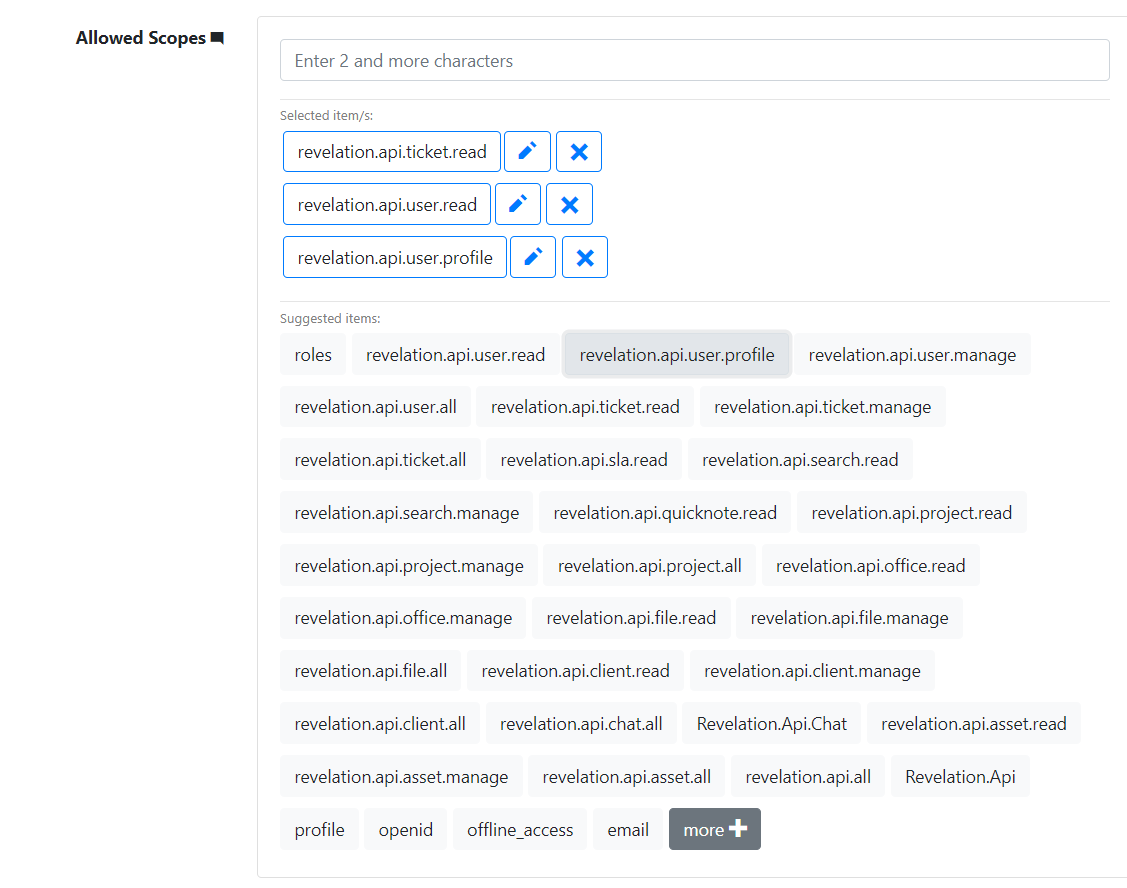
When you request a new access token from the Authorization server, you can include only the required scopes as long as it appears in the list of allowed scopes that were defined for that client.
In the example below we add scope=revelation.api.user.read to allow only permission to read user data:
Code |
curl -X POST "https://dev-win2019.revelationhelpdesk.com/Auth/113ec1d6-492d-41c0-81e1-9ba56a3e0ef8/connect/token" -H "Content-Type: application/x-www-form-urlencoded" -d "scope=revelation.api.user.read&grant_type=client_credentials&client_id=dev-win2019&client_secret=9f1ffe16-0d65-5bff-d555-bc154e5dba1a" |
If no scope parameter is specified, then the token will include all Allowed Scopes for that client. If a scope is not allowed or does not exist, the token request will return a 400 Bad Request error with { "error": "invalid_scope"}