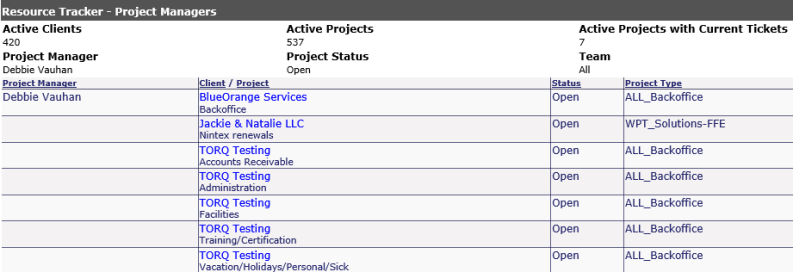
This report displays how many active clients and projects associated with the appropriate cost center are in Revelation before any client information is displayed. Also, your active clients/active projects totals will appear.
To run a full report, as with most of the report sections, leave the pull down at the default (Select One); all active projects will be appear. Once you hit Display on this screen, you get a full listing of all the projects sorted by Project Manager, showing who is responsible for which client and project.
The options for this report is as follows:
Team: Select the appropriate team
Project Manager: Select the appropriate manager
Project Status: Ability to filter by Open, Closed or On Hold using check boxes
Once the report displays, four columns will appear indicating the following:
Project Manager: The project manager assigned to the project.
Client/Project: The client/project assigned to that project manager. A client with multiple projects may have more than one Project Manager. It is not required that all projects for a client be assigned the same manager.
Status: The status of the project.
Cost Center: The Cost Center for the project.
In addition, you can sort this report by any of the column headings. Also, similar to the Resource Tracker by Client Project report, by clicking on the client/project will bring up the Project History screen. Clicking on the ticket number will bring up the ticket notes.
Resource Manager by Project Manager