Request Data
Once you have a valid access token you can use it to request data from the Revelation helpdesk API endpoints. To ensure that your API request is authorized make sure you include that access token in the Authorization header.
API endpoint
The API base URL will depend on your instance of Revelation helpdesk and can be found in the “Your API Details” section on the API integration dashboard:
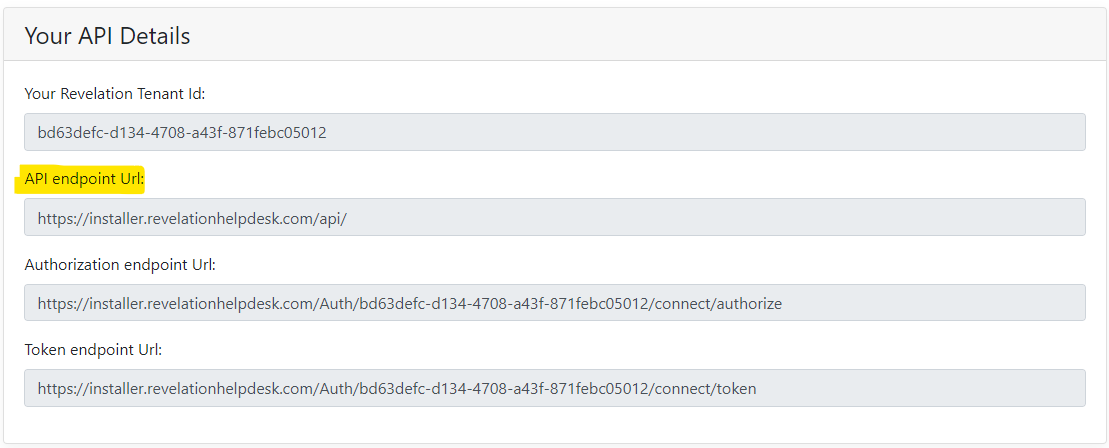
Based on your edition of Revelation helpdesk the URL format will be as follows:
Revelation Server (on-Prem)
https://<Your_Helpdesk_Url>/API
Revelation Cloud Edition
https://api.revelationhelpdesk.com/
Execute Request
The following example is a GET request to a fetch a ticket with ID 2000. Note that the Access Token is included in the Authorization header.
Code |
curl "https://api.revelationhelpdesk.com/v2/ticket/2000" -H "Authorization: Bearer eyJhbGciOiJSUzUxMiIsInR5cCI6ImF0K2p3dCJ9.eyJuYmYiOjE3MjYxNTMzMDgsImV4cCI6MTcyNjE1NjkwOCwiaXNzIjoiaHR0cHM6Ly93aW4yMDE5LnJldmVsYXRpb25oZWxwZGVzay5jb20vYXV0aC9hMmYxYzk0My0wYTczLTQzYjUtYjJmMC1jZTQxZmQwYTg0MWYiLCJhdWQiOlsiUmV2ZWxhdGlvbi5BcGkiLCJodHRwczo…." |
The response will be a HTTP 200 (OK) and the body is a JSON formatted object with the ticket details:
Code |
|