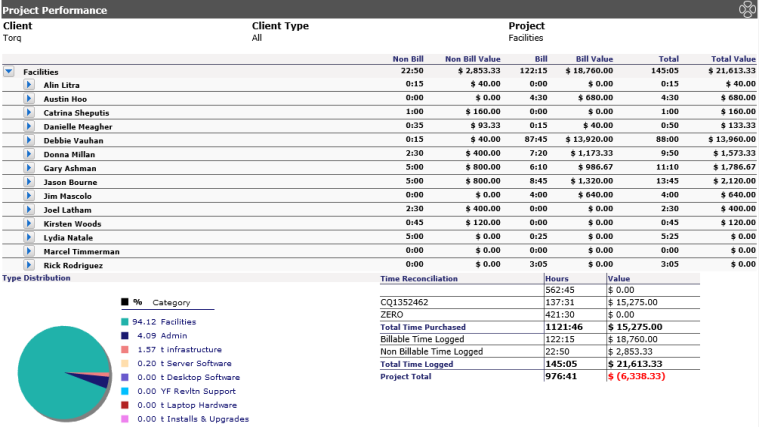
This report allows Administrators and Managers to see the total amount of Non Billable and Billable time for a specific client/project. The Non Billable and Billable columns will be displayed in hours, dollar amounts then total amount. By clicking on the arrow next to the staff name, a list of ticket numbers pertaining to the project will be listed. Details can be viewed by clicking on the ticket number. However, if the Display Currency-Internal Interface is set to Disabled in System Options, the non billable/billable rate will not appear on this report.
The options for this report are as follows:
Client Type: Select from a drop down
Client: Select the client
Project: Select the project
Location: The location for the client. If there are multiple locations, leaving at the default will show all locations.
Note: Only one client and one project may be selected at a time.
Once your report displays, columns will appear indicating the assigned staff, Non Billable Hours, Non Billable Value, Billable Hours, Billable Value, Total (Hours) and Total Value. Time Credits appear below the listing indicating the time used for Non Billable, Billable and total time for the project, and their associated values.
A pie chart appears showing the percentage break down of work done for a particular client/project based on the categories/ticket types.