
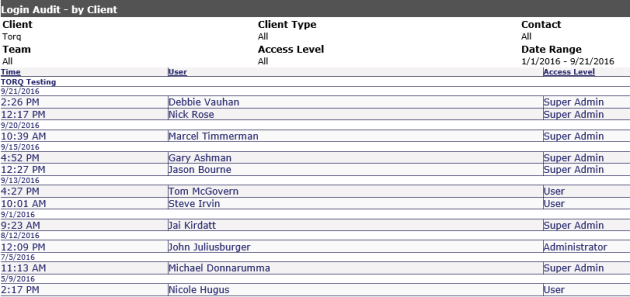
The Login Audit reports shows, which companies have logged into the End User Interface. If the default setting (Select One) is shown, the last log in time for Clients and Users will display. The ability to sort by column headings is available in this report.
The options for this report are as follows:
Client Type: Select using drop down or leave at default
Client: Select the appropriate client or you can select multiple clients by clicking on the arrow next to the pull down and holding the Ctrl key to select multiple Clients.
User: Specific users can be selected from this pull down if a single client is selected. You can select multiple users by clicking on the arrow next to the pull down. If multiple clients are selected, you will not be able to select users in this pull down.
Access Level: Admin, User and Administrator can be selected from the pull down which will show the selected access levels into the system.
Team: Select using drop down or leave at default
Show all login times: If this box is checked, all times and dates for the date range selected will be shown.
Start Date/End Date: A date range can be specified in these fields or from the calendar pull downs.
Pre Defined Dates: Today, This Week, Last Week, This Month (default) and Last Month can be selected.
Once your report displays, three columns will appear indicating the following:
Time/Date: Time and Date of last log in
User: List of users by clients
Access Level: The access level of the users per client
Clicking on the headings will sort the information within the client by the header.
NOTE: If Single Sign On is active, you'll be able to see if an end user has used SSO to log into Revelation helpdesk.