Getting started
To get started with the Revelation helpdesk API, login to the Revelation Admin area as a super admin user and click on "API Configuration" in the left menu.
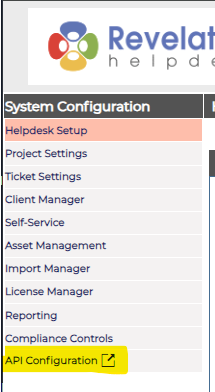
This will bring you to the Revelation helpdesk API dashboard. If you have insufficient permissions, you will receive a permissions error after login.
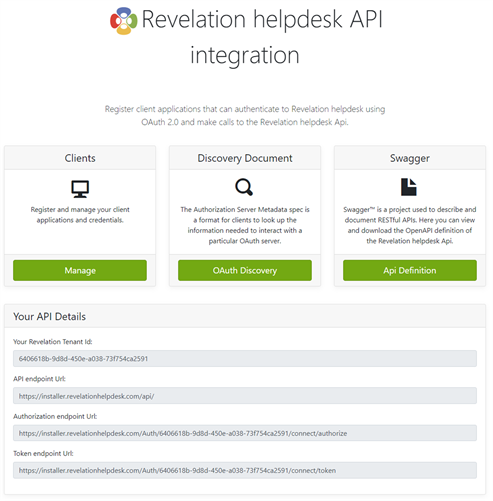
The API configuration page consists of 4 main sections:
Clients
This is where you will register your client applications that will be authorized to make calls to the Revelation helpdesk API.
Discovery Document
This is the OAuth 2.0 Authorization Server details. The discovery document contains details about the authorization server such as the token endpoint, authorization endpoint and supported scopes and grant types. Some OIDC libraries will use this endpoint to automatically discover your authorization server settings.
Swagger
Swagger is a project used to describe and document RESTful API endpoints. It can be used to list all the available endpoints in the Revelation helpdesk API and can help you execute these endpoints to see the data that is returned.
Your API Details
- Your Revelation Tenant ID – this is your Revelation Helpdesk tenant Id which is unique to your tenant and is used when calling some API endpoints that require the {tenantId} parameter.
- API Endpoint URL – this is the base URL to access the Revelation helpdesk API. E.g. https://<baseURI>/v2/user/me/ endpoint will return your user details.
- Authorization endpoint URL – The authorize endpoint can be used to request tokens or authorization codes on behalf of a user via the browser. This process typically involves authentication of a user account using the authorization_code grant type with optional consent.
- Token endpoint URL - The token endpoint can be used to programmatically request tokens, typically used for client_credentials and refresh_token grant types.