
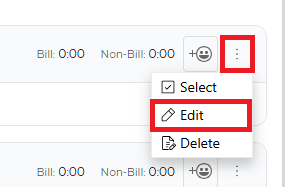
Open the ticket then, from the ticket details screen, click on the 3 dots menu on the right side of the action note (next to the emoji reaction icon) and click Edit. This will open the ticket action.
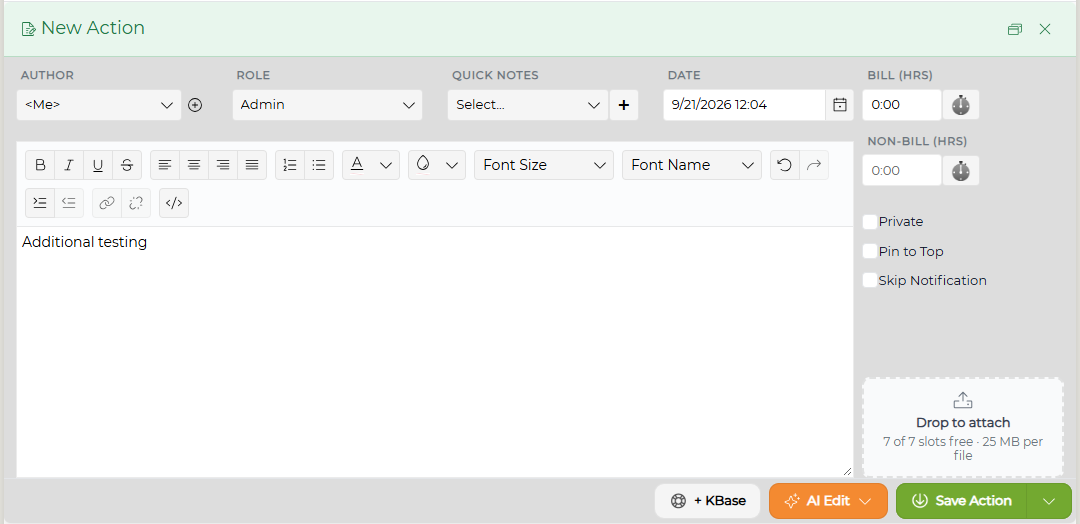
The following information can be edited:
Author - if permissions are set in the Admin area by a Super Administrator under Ticket Settings-Ticket Configuration.
Ticket Date/Time
Notes
- Quick Notes
Billable/Non-Billable Time (if set)
Role - by Manager and Administrators only
NOTE: If a report has been published using the Time Reconciliation report, actions prior to the lock down date of the report cannot be edited.