This report is only visible if you have Customer Feedback enabled.
The options for this report are as follows:
ClientType: Select specific type or leave at default.
Client: Multiple clients can be selected by clicking on the arrow. You then click on each client you want to see while holding the Ctrl key. If you want to see all the clients, simply leave the pull down box blank.
Project: Can only be selected if a single client has been selected. If the default of all, or if multiple clients are selected, this option will not be available.
Location: The location for the client. If there are multiple locations, leaving at the default will show all locations.
Team: Select a specific team or leave at default for all.
Ticket Type: Select from the drop down or leave at default
Sub Type:Select from the drop down or leave at default
Predefined Dates: The options are Today (default), This Week, Last Week, This Month, and Last Month.
Start Date/End Date: As with the other reports, you can specify a date range outside the predefined dates.
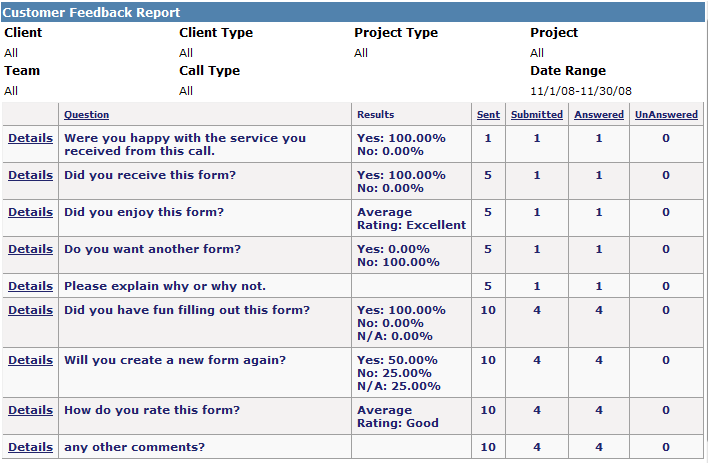
When the report is run, a list of the form responses that have come through are listed. If it is a rating, it will show the average; if Yes/No/NA, it will give the percentages based on the responses. Free Form responses are not shown, though the number of responses are listed.
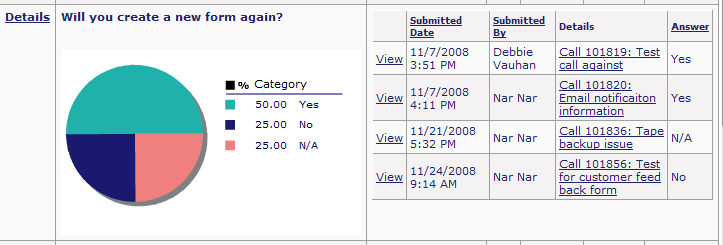
To get more information, including a pie chart on the response percentages, click on the Details link for the question. The display will include a pie chart of the percentages, the date the form was submitted, who submitted it and the ticket number. If it is a Yes/No/NA type answer or a rating type answer, the information will also be shown.