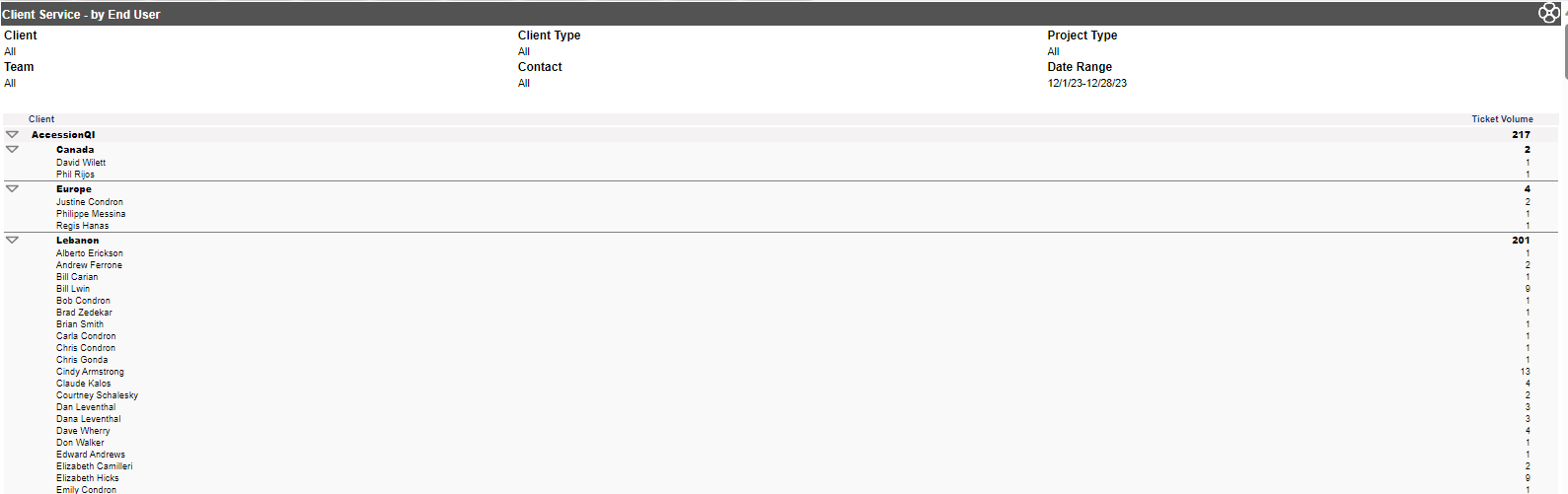
This report allows Administrators and Managers to see which users at a client site have tickets logged in Revelation. These may be tickets the client logged or tickets logged by internal staff, but referred to the contact at the client site
The options for this report are as follows:
Report Type: Time or Volume default is set in Admin-System Options, but either can be selected
Client Type: Select specific type or leave at default
Client: Multiple clients can be selected by clicking on the arrow. You then click on each client you want to see while holding the Ctrl key. If you want to see all the clients, simply leave the pull down box blank. However, if selecting multiple clients, the user pull down is not an option.
Location: The location for the client. If there are multiple locations, leaving at the default will show all locations.
User: If selecting one client, those users can be selected by clicking on the arrow. You then click on each user you want to see while holding the Ctrl key.
Cost Center: Select from the drop down or leave at the default for all.
Team: Select from the drop down or leave at the default for all.
Predefined Dates: The options are Today, This Week, Last Week, This Month (default) and Last Month.
Start Date/End Date: As with the other reports, you can specify a date range outside the predefined dates or select the specific date range with the calendar pull downs.
Once your report displays, no ticket numbers are provided, just totals for the periods specified. Depending on your report criteria specified, the columns in this report will be displayed as the following:
Client/Location: A sub heading under each client for each location.
User: All users at that client/location
Non Bill/Bill: The amount of time non-billed/billed to that client/location for that specified time frame.
Total: The total non-bill/bill time or Ticket Volume for each client/location for the specified time frame.
These descriptions are based on having the Time option set. If Volume is selected, one column with Ticket Volume totals will appear.